How to Install Keyboard Mode “Secondary v2”
Thanks to this module, Kozy Macro will press keys on your computer as if a real physical device is sending keystrokes. This ensures that no obstacles interfere and provides a seamless experience.
Requirements:
Installation:
If you encounter any errors during installation, please contact support or leave a comment under the related topic before proceeding.
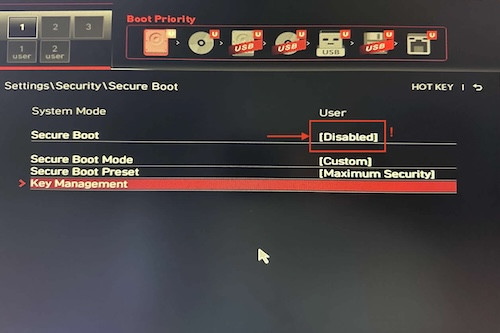
1 – Disable “Secure Boot” in BIOS
The steps may vary depending on your motherboard brand. Below is an example screenshot for MSI motherboards. Secure Boot must be disabled before beginning.
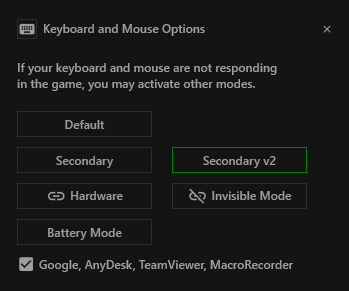
2 – Select Secondary v2
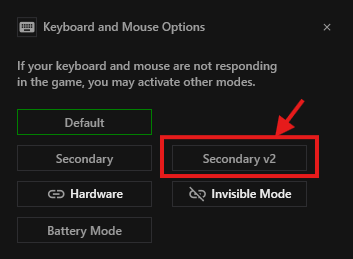
Open Kozy → Settings → Keyboard icon, then click Secondary v2.
If additional Microsoft-based components are required, a confirmation window will appear. Approve the installation.
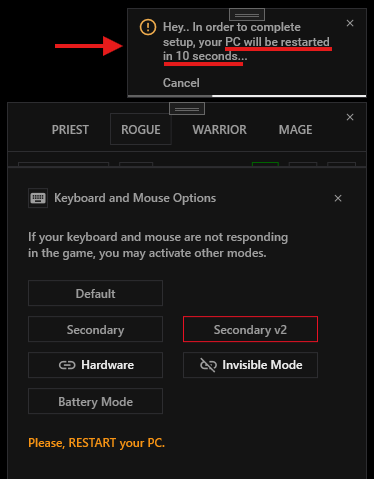
3 – Restart PC
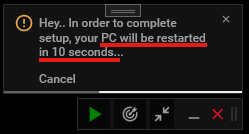
Your computer will automatically restart within 10 seconds.
4 – Reopen Kozy
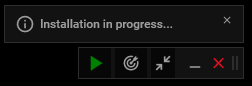
After the computer restarts, launch Kozy again. The installation will continue automatically.
5 – Installation Completed
After waiting for a short while, a message prompting you to restart your PC will appear.
Your computer will restart automatically within 10 seconds.
🎉 Congratulations! Everything is now ready to use.
You may re-enable Secure Boot if you prefer.
If you want to remove this installation, go to Kozy → Settings → Reset, and click “Yes, reset” in the confirmation window and restart. This will completely remove the module.
Enjoy your game!
